The automation worked during the demonstration. Forms created records, documents appeared in the correct folder and notifications arrived on schedule. Three months later, employees are copying information manually again.
Perhaps a source column changed. An employee left and nobody inherited the account. A password expired. The workflow continued running but sent incorrect information. The vendor completed the project, while the business assumed the solution would maintain itself.
Many automation failures are not failures of initial development. They are failures of ownership after handover.
Software operates inside a changing business. Staff roles change, services evolve, vendors update interfaces, policies are revised and exceptions accumulate. A sustainable automation therefore needs an operating model, not only a working configuration.
This guide explains what should exist at handover and how an SME can keep automation useful without creating a large internal technology department.
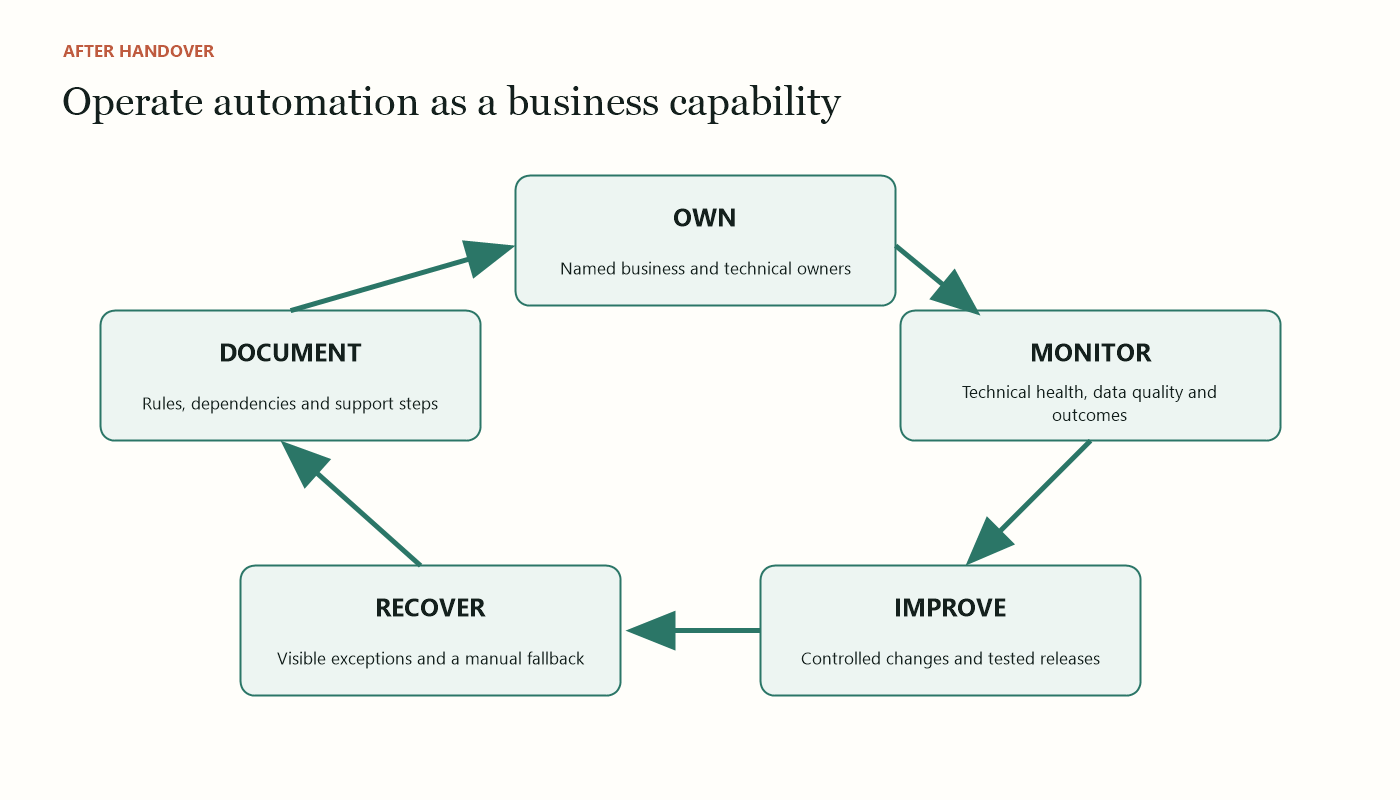
Launch is the beginning of operations
A project team focuses on reaching an approved result. An operations team must keep that result dependable through ordinary change.
The distinction affects design. During a project, the developer may remember why a field is transformed or why a particular exception is ignored. Six months later, a new employee sees only a collection of steps and connections.
Treat every automation as a small operational service. It has users, inputs, dependencies, expected outcomes, risks and a service owner. It needs routine checks and a controlled way to change.
This does not require enterprise bureaucracy. A one-page service record, a monthly review and a named owner can prevent many common failures.
Failure 1: nobody owns the outcome
The person who requested the automation may assume the vendor monitors it. The vendor may assume the process owner will report problems. IT may manage accounts but not understand the business result.
Assign two forms of ownership.
The business owner is accountable for whether the automated process continues to meet operational needs. This person approves rule changes and decides priorities.
The technical owner maintains connections, credentials, platform settings and technical troubleshooting. The role may belong to an employee, managed service provider or consultant.
Name a backup for each. Record contact details and the expected response when a failure occurs. Ownership should attach to roles rather than exist only in one person’s memory.
If the automation sends invoices, updates customer records or handles personal data, identify the people responsible for those consequences as well. Technology ownership does not replace financial, commercial or data-protection accountability.
Failure 2: the documentation describes screens, not decisions
Screenshots showing where to click can become obsolete after a software update. More importantly, they may not explain why the workflow behaves as it does.
Sustainable documentation should cover:
- the business purpose and success measure;
- the trigger and expected outcome;
- systems, accounts and dependencies;
- authoritative sources for important fields;
- business rules and why they exist;
- human approval points;
- known exceptions and their routes;
- failure alerts and recovery steps;
- data retention and access requirements;
- change history; and
- owner and support contacts.
Include a simple diagram that a manager can understand. Then include enough technical detail for the person who must repair the workflow.
Store documentation in an approved shared location, not the vendor’s private notes or an employee’s personal drive. Set a review date. Documentation that nobody is expected to update will decay quickly.
Failure 3: success is measured only at launch
A workflow can report “successful” runs while producing poor business outcomes. It may create duplicate records, send notifications nobody reads or move incomplete data to the next stage.
Monitor at three levels.
Technical health
Is the workflow running? Are integrations authenticating? Are actions failing or retrying? Are queues growing?
Data quality
Are required fields present? Are duplicate, malformed or unexpected values increasing? Is information reaching the correct record?
Business outcome
Has handling time improved? Are handovers faster? Has rework fallen? Are customers receiving accurate communication?
These measures should lead to action. Define thresholds and the person who responds. A dashboard that nobody reviews is decoration.
For low-volume workflows, a weekly or monthly sample may be more useful than real-time analytics. The monitoring approach should match consequence and volume.
Failure 4: exceptions remain invisible
Automation is often designed around the happy path. Real work includes missing fields, duplicate requests, changed scopes, unavailable systems and cases that require judgement.
If the workflow has no explicit exception route, it may silently drop the item, repeatedly retry or create a misleading success state.
Every important automation needs an exception queue or alert that contains enough context for a person to act. The item should show what failed, what already happened, what did not happen and whether retrying could create duplication.
Assign the exception to a role and establish a review frequency. Preserve the original input. Record how the case was resolved so recurring causes can be fixed.
Do not aim for zero exceptions at any cost. Forcing unusual cases through a standard route can be more dangerous than handing them to a person. The objective is visible, manageable exceptions.
Failure 5: credentials and permissions are personal
A workflow built under an employee’s account may stop when that person leaves, changes password or loses a licence. It may also continue with permissions that are too broad because the account was convenient during development.
Use organisation-controlled accounts and connections where the platform supports them. Apply the least access needed. Document authentication methods, renewal dates and account ownership without placing passwords inside the operating guide.
Review access during employee onboarding, role changes and offboarding. Remove development permissions after launch. Test that the backup owner can reach the administration and logs.
Service accounts also need governance. They should not become invisible super-users with permanent access to every system.
Failure 6: upstream changes are not controlled
A small change can break an automation: someone renames a spreadsheet column, edits a form choice, moves a folder or changes an accounting status.
Identify critical dependencies and place simple change controls around them. Label fields or sheets used by automation. Restrict editing where appropriate. Ask system owners to notify the automation owner before changing an interface, template or business rule.
Where possible, validate inputs. If a required field disappears or contains an unexpected value, stop and create an exception instead of guessing.
Maintain a test case that can be run after changes. The test should confirm the end-to-end business outcome, not only that individual steps execute.
Failure 7: the business process evolves but the workflow does not
An SME may add a service, change approval authority or enter a new market. Employees adapt informally, while the automation continues applying the old rules.
Schedule periodic business reviews. Ask whether the purpose, volume, rules, exception types and risks have changed. Compare the documented workflow with actual practice.
Watch for workarounds. If employees repeatedly edit outputs, maintain shadow spreadsheets or bypass an approval, investigate why. Workarounds may indicate poor training, but they can also reveal that the automated process no longer fits.
Do not automatically encode every workaround. First decide whether the underlying process should change.
Failure 8: vendor dependency is mistaken for support
External expertise can be efficient, but the business still needs control over access, documentation and continuity.
Clarify the support arrangement before launch:
- what is included after handover;
- support hours and response expectations;
- how incidents are reported;
- whether platform or integration updates are covered;
- rates and approval for enhancements;
- ownership of configuration, code and documentation;
- access if the relationship ends; and
- assistance with export or transition.
Avoid a design that only one individual can understand or access. The business should be able to appoint another qualified provider without rebuilding from nothing.
Portability is not the same as eliminating vendor relationships. It means retaining practical options.
Failure 9: no manual fallback exists
Connected services will occasionally be unavailable. A sustainable process defines how work continues.
The fallback may be a controlled manual form, a temporary queue or a procedure to hold requests until recovery. Specify who declares the fallback, how items are tracked and how they are reconciled after the automation returns.
Avoid uncontrolled parallel processes. If employees use a backup spreadsheet, give it a clear status and owner. Otherwise the team may process items twice or lose track of which record is official.
Test the fallback before an incident. A procedure that has never been exercised is an assumption.
The minimum viable handover pack
An SME does not need hundreds of pages. It needs a usable pack containing:
- Service overview: purpose, users, owner, systems and business measure.
- Workflow diagram: trigger, steps, decisions, approvals and exception route.
- Operating guide: normal use, review responsibilities and known limits.
- Support guide: alerts, logs, recovery, escalation and fallback.
- Access register: administrative roles, service accounts and review schedule.
- Test pack: representative normal, incomplete and exceptional cases.
- Change log: what changed, why, who approved it and when it was tested.
- Vendor and licence record: subscriptions, renewal dates, dependencies and exit information.
Conduct a handover session using a real scenario. Ask the receiving owner to explain the workflow and perform a recovery task. A presentation alone does not prove transfer of knowledge.
Use a simple operating rhythm
Create a schedule proportionate to the process.
Weekly or operational review
Check failed runs, exception queues and urgent user reports. High-consequence workflows may require daily attention.
Monthly service review
Review volume, success rate, material errors, time saved, recurring exceptions and access changes. Confirm that documentation still matches the process.
Quarterly improvement review
Assess business rules, user behaviour, vendor changes, licence value and the improvement backlog. Retire unused features and obsolete data.
Annual resilience review
Test fallback and recovery, verify owners and backups, review contracts and confirm the business can access or export its configuration and records.
Keep meetings short and evidence-based. The rhythm matters more than formal ceremony.
Control changes without blocking improvement
Automation should evolve, but uncontrolled edits can introduce hidden consequences.
For every material change, record the request, reason, affected systems, risk, approver, test result and release date. Keep a copy or version that allows recovery where the platform supports it.
Test normal cases, edge cases and duplicate prevention. If the workflow sends external communication or changes financial records, use a staging environment or restricted test route when possible.
Communicate changes to users in operational language. Explain what will behave differently and what they should do when something looks wrong.
Small changes still deserve proportionate review. A renamed field may be technically simple but operationally significant.
Decide when to repair, redesign or retire
Not every automation should survive indefinitely.
Repair when the purpose remains valid and the failure is contained. Redesign when exceptions, workarounds or maintenance effort show that the process has changed substantially. Retire when volume disappears, the platform is replaced or the control burden exceeds the value.
Include ongoing costs in the decision: licences, vendor support, monitoring, employee review and incident handling. An automation that saves two hours per month but requires three hours of maintenance is not sustainable simply because it is technically impressive.
Retirement also needs a plan. Disable triggers, revoke connections, archive required records, update documentation and tell users which process replaces it.
Sustainability begins during design
The easiest automation to maintain is one designed with maintenance in mind. Prefer clear rules, modular steps, visible logs and standard integrations. Avoid unnecessary complexity and undocumented custom code.
Expose important failures. Preserve original inputs. Make human approvals explicit. Use organisation-controlled accounts. Create documentation while decisions are fresh, not on the final afternoon of the project.
Most importantly, involve the future owner before launch. Handover is not the moment when ownership begins; it is the confirmation that ownership has already been accepted.
From project deliverable to business capability
An automation creates durable value when the organisation can explain it, monitor it, recover it and change it responsibly.
The technology will never be completely maintenance-free. That is not a defect. Business processes and connected systems change. Sustainability comes from recognising that reality and assigning proportionate care.
For an SME, the formula is straightforward: a named owner, current documentation, visible exceptions, controlled access, useful measures, a tested fallback and a clear support arrangement. Those practices turn a successful demonstration into an operating capability—and prevent the team from quietly returning to manual work after the project is declared complete.
Sources and further reading
Want to make this practical for your business?
Start with the operational problem, the people involved and the outcome you need.